

Imagine the project checklist is finally ready. You ask OpenClaw to run a quick check. It returns some output and says the check has finished. You open your project folder, but the report you expected is nowhere to be found.
The immediate suspicion is that it forgot to save. There is a more basic possibility, though: you and the assistant may not mean the same place when you say “here.”
Last time, we followed a model failure and watched the work resume. This time, we follow a tool call to the place where it actually executes. The same command can run on the Gateway machine, through a sandbox backend, or on a connected node. Its text stays the same while its files, dependencies, and permissions can change completely.
The story is hypothetical. This article keeps the same source baseline, commit a374c3a corresponding to v2026.5.22, and concentrates on the Docker backend. Docker’s isolation properties do not automatically apply to other backends. We will follow the command from its destination to the place where its results remain.
Choose the destination, then understand the permission
The earlier article on tool policy asked whether an Agent could use a capability. Sandboxing asks where an allowed operation executes. Execution approvals add constraints on individual commands. These mechanisms interact, but each answers a different question. Official explanation of the boundaries
Having exec does not let a model choose any machine it likes. Running inside a container does not necessarily make the original project unwritable. Confusing these facts makes it easy to assume that restricting tools also protects every host resource.
OpenClaw first determines whether a session should be sandboxed. off disables it; all covers every session; non-main compares the normalized session key with the main-session key. Here, main is a session identity, not an Agent named “main.” Main-session aliases are canonicalized before comparison. Configuration resolution defaults the mode to off. Session classification · Configuration defaults
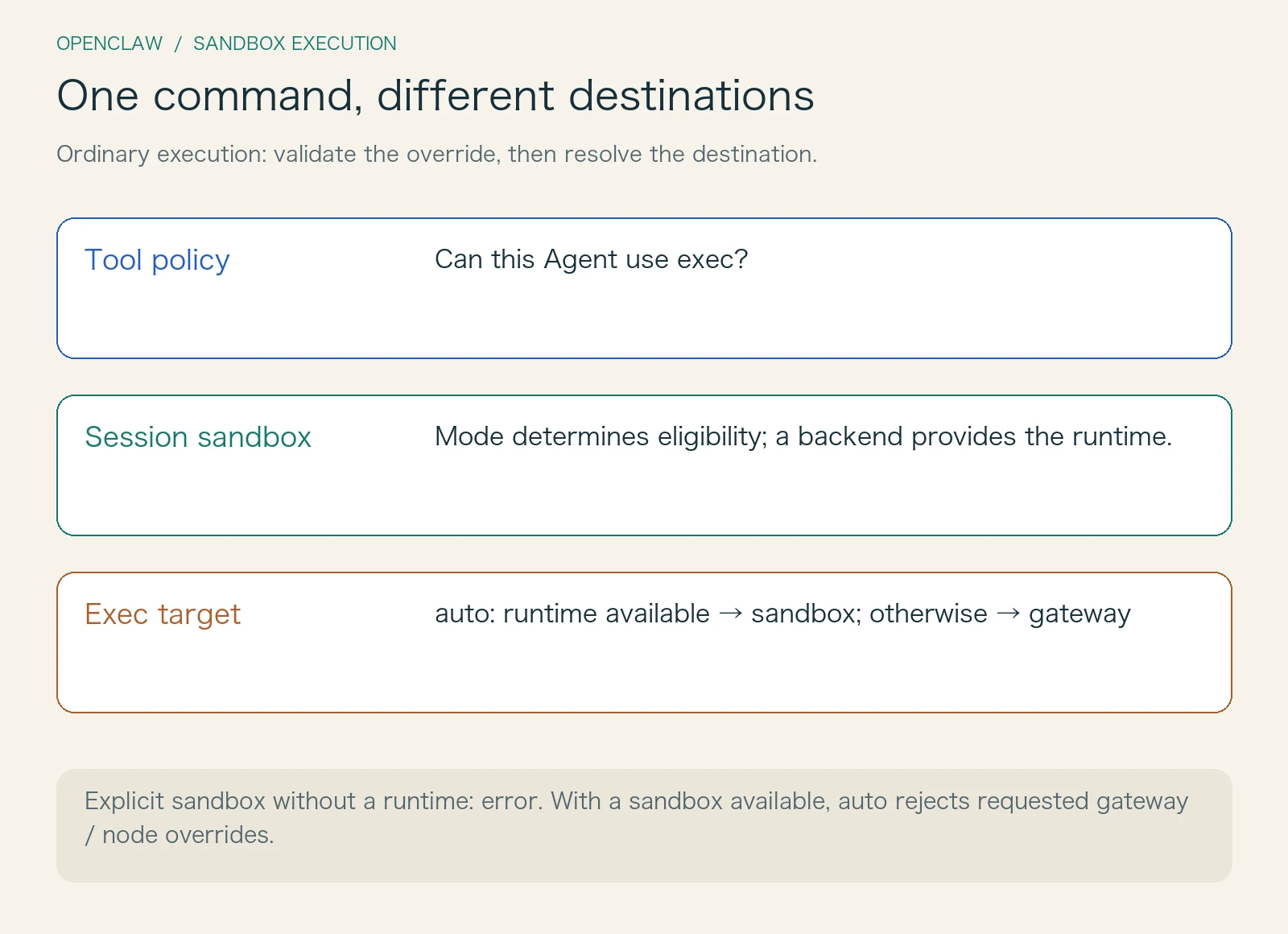
The exec tool then resolves its own target. The configured target defaults to auto: use sandbox when a runtime is available, otherwise use gateway. This decision happens in the execution layer. It does not conjure an available container into existence merely because a tool call needs one.
A requested host cannot freely override configuration. With auto configured and a sandbox available, requests to switch to gateway or node are rejected. A fixed configured target also prevents switching to a different target. If sandbox is explicitly selected but no runtime exists, the caller raises an error instead of silently falling back to Gateway. Target selection · Missing-runtime guard
Automatic selection and an explicit sandbox requirement therefore express different promises. One chooses a destination from the available environment. The other requires that a particular boundary exist. An Agent platform can make this distinction visible instead of hiding both cases behind a generic “running” indicator.
A different room comes with a different desk
Return to the missing report. Suppose the command did enter a Docker sandbox. The next question is which files the container’s working directory represents.
The sandbox context retains both agentWorkspaceDir and workspaceDir. The first is the Agent’s project workspace; the second is the workspace used by the sandbox. With workspaceAccess=rw, the latter directly uses the former. Other modes choose a sandbox directory, prepare its basic workspace content, and attempt to synchronize skill files. This does not promise a complete project copy with automatic two-way synchronization afterward. Workspace preparation
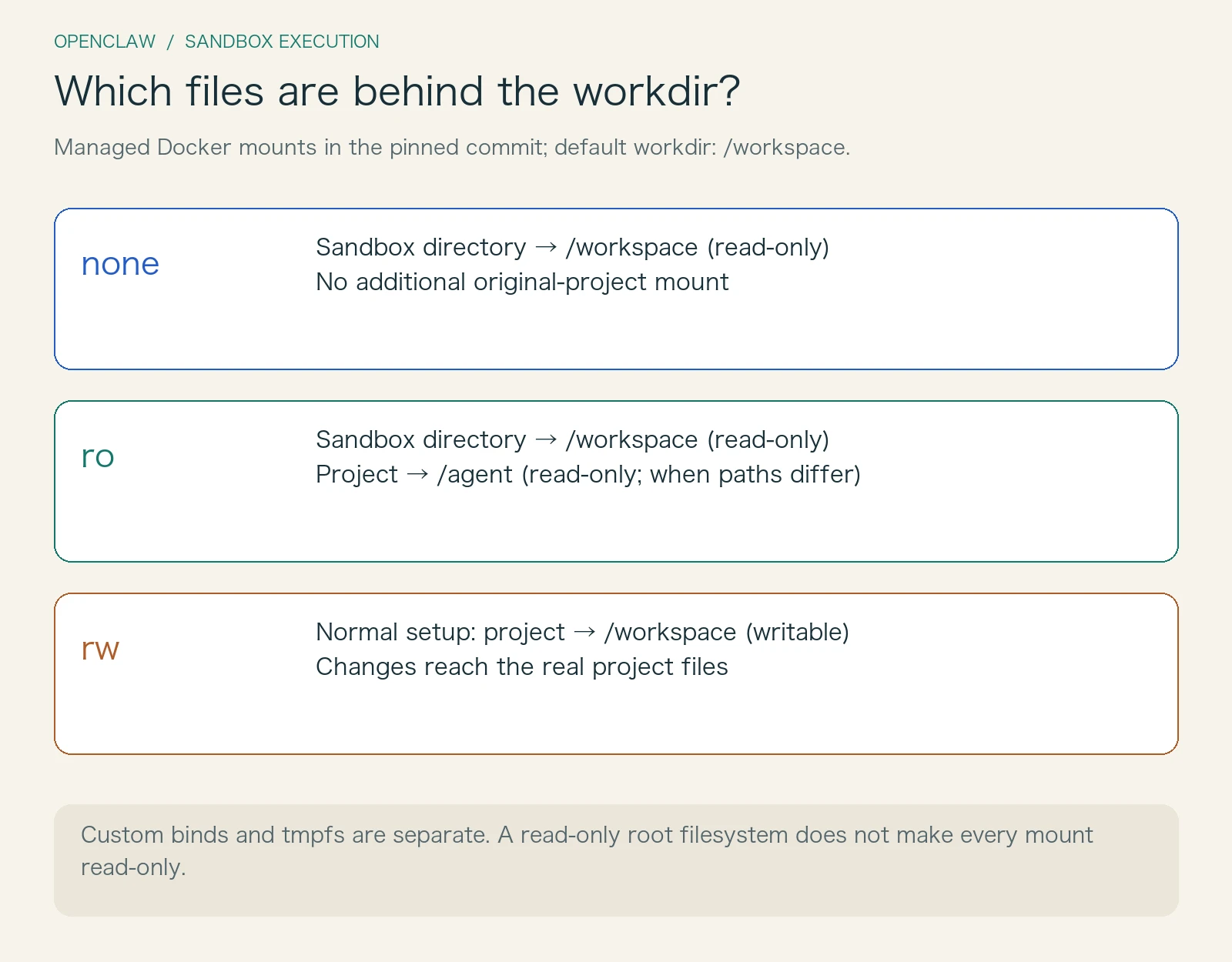
Mount arguments determine what Docker actually sees. The pinned implementation deserves careful attention: the main workspace is mounted at the configured container workdir, and only rw makes that mount writable. Both none and ro add the read-only flag. If project access is allowed and the two directories differ, the project is also mounted at /agent, read-only in ro mode. Mount argument construction
| Mode | Source and permissions of the main workdir | Additional access to the original project |
|---|---|---|
none |
Sandbox workspace, read-only | No additional project mount |
ro |
Sandbox workspace, read-only | Mounted at /agent, read-only, when directories differ |
rw |
Normal preparation directly uses the project workspace, writable | The directories are identical, so no duplicate mount is needed |
This table describes OpenClaw’s managed Docker workspace mounts. Additional binds can expose other paths, so none does not mean the container can never see any host files. The default workspaceAccess is none, but that does not make every location inside the container unwritable: the default configuration also provides tmpfs locations such as /tmp.
The story now has several plausible explanations. The check may have printed to the terminal without creating a report. It may have failed when writing to a read-only directory. Or it may have written its output into a temporary container directory. These require different responses. Rerunning the command without checking its working directory and exit status is unlikely to clarify anything.
When the task really requires changes to the original project, a writable mount means those changes reach the real directory. The sandbox constrains the process environment; it does not turn explicitly granted write access into a deferred “save after confirmation” operation. A useful tool result should therefore include its actual target, working directory, and artifact path wherever possible, so someone can check the right place.
One more detail helps separate a missing file from an unwritable file. When preparing the Docker user, the context checks for an explicit user setting first. Without one, it attempts to read the working directory’s numeric UID and GID and constructs a container user from them. Failed reads or invalid values leave the original configuration unchanged. This coordinates ownership of mounted files; it does not grant the model extra permissions. A host path existing, a container seeing it, and a process being allowed to write it are three successive questions. User identity preparation
I would debug the report along those three questions: identify the path the command wrote to, identify the mount behind that path, and check whether both the mount and process identity permit writing. A temporary artifact needs an explicit export. An artifact that was never generated sends us back to the command’s exit status. There is no need to attribute every failure to the model’s understanding.
A room per conversation, or a shared workspace?
Once file locations are clear, another question appears: will the next visit encounter something left by the previous one?
That depends on scope. session separates environments by session, agent groups them by Agent, and shared uses a common scope key. The current default is agent. The configuration still accepts the older perSession setting, but an explicit scope takes precedence. Distinct conversation keys can therefore lead to the same Agent sandbox. Separate chats do not necessarily mean separate execution environments. Scope resolution · Scope keys and directory names
Directory names do not simply concatenate a raw session key. The implementation creates a readable sanitized fragment, limits its length, and appends the first eight characters of the raw value’s SHA-256 hash. This helps keep names recognizable while reducing collisions between distinct keys that sanitize to the same text. A short hash does not provide an absolute mathematical guarantee against collisions.
As an engineering tradeoff, session scope makes task environments easier to separate but increases their number and initialization work. Agent scope makes dependency reuse easier while allowing that Agent’s sessions to share an environment. Shared scope broadens reuse further. These are implications of the isolation granularity, not performance rankings measured in this article.
There is another detail that feels familiar in everyday operation: changing configuration does not necessarily remove an existing container immediately. The Docker implementation hashes configuration, workspace information, and the mount format, then compares that hash with the existing container’s record. When they differ, a running, recently used container is preserved and a recreation hint is logged. A container that is not hot follows the removal-and-recreation path. The hot window is five minutes; a running container with no last-used record is also treated as hot. Container reuse and configuration hashes
This explains why a new value in the configuration file does not prove that the current command used a new environment. Reuse avoids repeated startup work, but it also makes configuration activation part of runtime state. A product that shows only intended configuration can send debugging in circles if it never shows the container that actually ran.
Walls, with deliberately opened doors
Docker creation arguments translate abstract settings into concrete restrictions: a read-only root filesystem by default, no network by default, dropped ALL capabilities, and no-new-privileges. Tmpfs, workspace mounts, and explicitly configured environment variables provide room for tools to do useful work. PID, memory, and CPU limits have corresponding arguments, but those arguments are added only when their configuration satisfies the relevant conditions. Supporting resource limits does not mean default resource quotas have been set. Defaults · Docker argument construction
Elevated execution is a separate door. The entry point first checks whether it is enabled and whether the requester is allowed. After those gates, target resolution sends non-node selections to gateway while preserving node. The full level also changes approval behavior. Elevated therefore cannot be summarized as “become root inside the container.” Nor should it be described as a switch that lets the model freely leave a sandbox while ignoring the authorization gates. Elevated execution and approvals
A remote node exposes another easy-to-miss boundary: paths belong to machines. The implementation forwards only a cwd explicitly supplied in the tool call; it does not force the Gateway’s default workspace onto the remote machine. An absolute Linux project path may mean nothing on a Windows node. This small branch gives execution hosts real filesystem semantics beyond their configuration names.
Dependency installation during container startup also deserves separate attention. The implementation runs setupCommand after creating and starting a new container; reusing an existing container does not rerun it for every call. With networking disabled by default, downloading dependencies cannot be assumed to succeed. Preparing stable dependencies in an image, while keeping task inputs and outputs in explicit locations, is often more predictable. This is an engineering suggestion, not a universal configuration template. Creation and initialization order
Make the environment part of the result
OpenClaw does not force every backend into the Docker implementation. Its context calls a registered backend factory to create a runtime, then obtains its runtime identity, working directory, and filesystem bridge capability. Docker is the implementation followed here. Backends such as SSH need their own path and environment contracts. Browser support is also checked against backend capabilities. Backend registration · Context assembly
When adapting the design to another Agent platform, I would keep several components independent: policy decides whether a capability is available, target resolution chooses the destination, a backend manages environment lifecycle, and filesystem bridging handles path and read/write semantics. Results carry execution evidence back across those boundaries. Replacing a remote executor then need not require rewriting tool permissions at the same time.
This article extracted contiguous function segments directly from the pinned source, removed their TypeScript types, and ran 26 local checks. They cover ordinary target selection, elevated target rewriting, scope defaults, session-mode comparison, and workspace mount arguments. Main-session alias canonicalization, the complete authorization flow, actual Docker isolation, remote node execution, and filesystem bridging were inspected statically rather than exercised end to end.
Where the report ended up must be answered by the actual command and its environment. When an assistant says “finished,” adding where it ran, which files it affected, and where it placed the result is often more useful than a much longer celebration of success.