

Last time, we asked OpenClaw to read some meeting notes and produce three action items. The checklist is now in the chat window. You like it, so you add one more request:
Save that to
notes/todo.mdfor me.
This time, no file is written.
Before blaming the model, consider how this hypothetical assistant is configured. If it has only been given a read tool, there is a real boundary between understanding a save request and being able to perform it. It can show you the text again. Saying “Done, saved” cannot make a file appear on disk.
That scene picks up the question left open in the previous article: who chooses the tools a model receives? And once a tool is available, why might an actual call still be refused? Let's follow the small task of reading notes and saving a checklist to see how OpenClaw connects capabilities with permissions.
We continue with the OpenClaw v2026.5.22 source snapshot, focusing on ordinary tool assembly and filesystem boundaries in the built-in Pi path. Deferred tool discovery, individual plugins, and other harnesses have additional integration details that we will not trace here. Tool assembly entry point
The Toolbox May Be Smaller Than You Expect
In an ordinary chat, a model can finish by writing a suggestion. In an Agent system, it also receives tool names, descriptions, and parameter schemas, so it can request actions that actually do something.
OpenClaw does not simply hand it every tool in the repository. Whether a tool can be constructed depends on the environment, model compatibility, configuration, and loaded plugins. Once candidates exist, they pass through a policy pipeline before becoming the tools available for this run.
Think of preparing equipment for a particular job. Having a file-writing implementation somewhere in the project does not mean a meeting-notes assistant must receive it. For an assistant meant to read and summarize, fewer capabilities may fit its responsibilities better.
The source pipeline processes the profile, provider profile, global policy, provider policy, Agent policy, and applicable group and sender policies. Tool assembly then adds sandbox, subagent, and inherited policies where relevant. Not every run has all these restrictions, but each has a defined place. Policy pipeline
Back to our checklist: if write has already been filtered out, the model does not acquire its implementation merely because it promised to save something. The program still owns tool registration and lookup. A natural-language commitment cannot replace a successful tool execution.
“I Put It in allow.” Why Isn't That Enough?
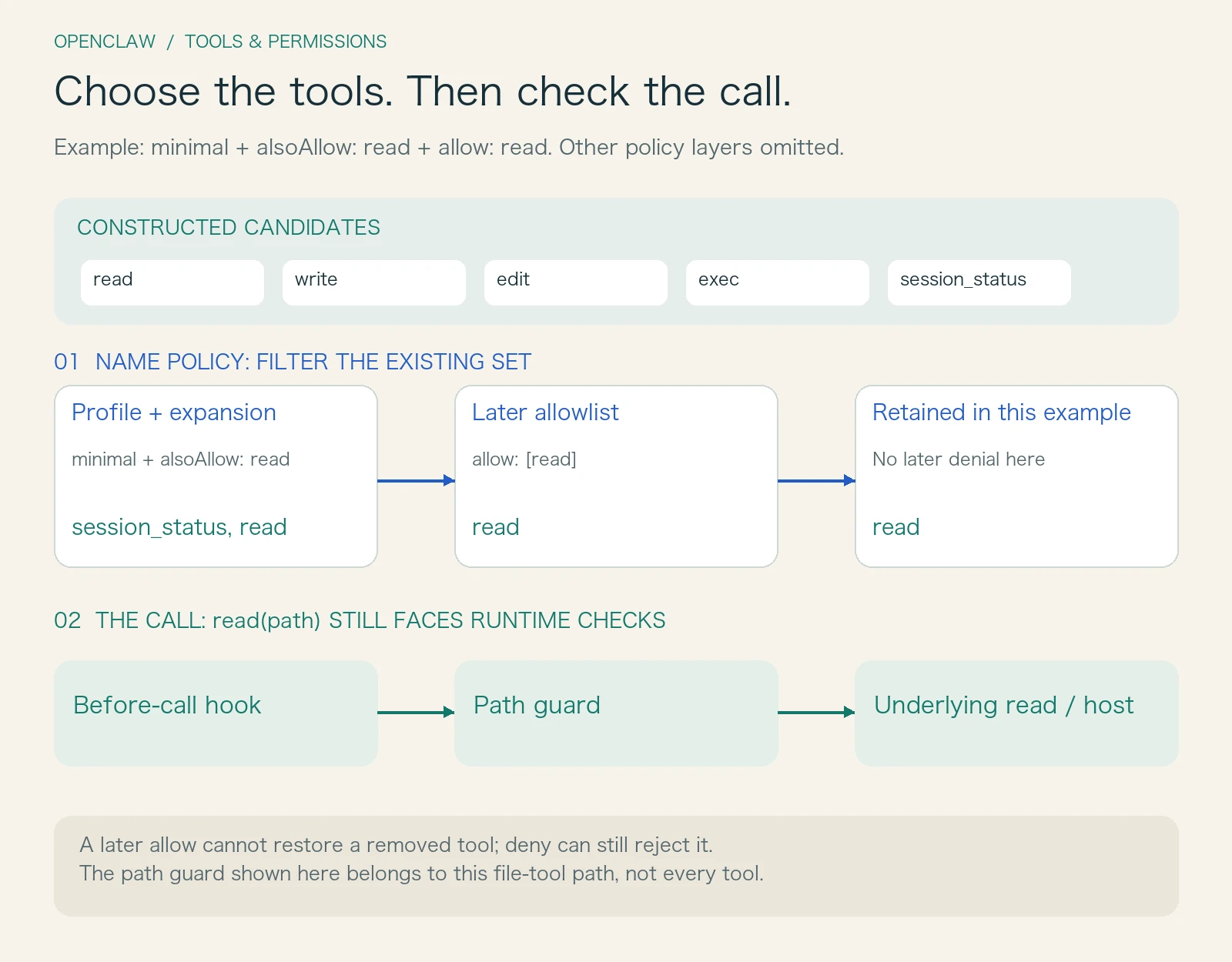
Suppose you inspect the configuration and find a small minimal profile. In this version, its baseline contains only session_status. You add read to a later allow list, expecting the assistant to start reading the notes.
It still does not work as expected.
The trap is how allow operates. The pipeline does not continually add tools to the toolbox; each stage filters the candidates that remain. If the profile has already removed read, a later rule saying “allow only read” cannot put it back. In this simplified example, the final collection may even be empty.
Expanding a profile's baseline must happen before that profile is applied. OpenClaw merges alsoAllow at the profile stage precisely to avoid removing a tool before a later layer can use it. Profile expansion and effective policy resolution
The following excerpt illustrates the relevant fields. For this version's ordinary file-tool path, it adds reading to the baseline, narrows the permitted names, and enables workspace path restrictions. Other policy layers can still impose further limits.
{
  "tools": {
    "profile": "minimal",
    "alsoAllow": ["read"],
    "allow": ["read"],
    "fs": { "workspaceOnly": true }
  }
}
Those are three different operations: alsoAllow expands the baseline, allow keeps matching tools, and workspaceOnly constrains filesystem paths. Treating all three as interchangeable ways to “enable permissions” makes it easy to change the wrong thing.
Within a policy, deny is checked before allow. A name appearing in both is still denied. Another detail is less intuitive: in this snapshot's matcher, an empty allow: [] does not mean deny everything. With no effective allow patterns, that layer adds no allowlist restriction. An explicit deny: ["*"] can express a complete denial. Name matching rules
These are poor candidates for guesswork. When something appears to be configured already, identifying the layer you changed is more useful than repeatedly adding names to lists.
An Available Tool Cannot Necessarily Read Every File
Now read is available, and the assistant successfully opens notes/meeting.md inside the workspace.
You add, “There is another document in a shared directory outside the workspace. Read that too.” The same tool may now report that the path escapes its allowed root.
There is no contradiction. Name policy decides whether a capability such as read belongs in the tool collection. It does not know which path a future call will contain. Only when the model supplies arguments can the file tool check the actual target.
For host reads with workspaceOnly enabled, OpenClaw wraps the tool in a workspace guard. A call reaches that wrapper, its path is resolved and checked against the root boundary, and only then can the underlying read proceed. A relative path containing .. needs more than a visual inspection. A symlink inside the workspace may point outside it, so the path check also invokes dedicated alias-escape checking. File-tool wrapper and path checks
The two reads look like this:
| Call | Tool-name policy | Path policy |
|---|---|---|
| Read meeting notes inside the workspace | read is permitted |
The target is inside an allowed root, so execution may continue |
| Read an unrelated external document | The same read remains permitted |
With workspace restrictions enabled, an escaping target is rejected |
The model seeing a tool is therefore only an intermediate state. A valid tool name and argument structure do not establish access to the requested resource. Even after path checks pass, the file might be missing or the operating system might refuse access. These failures should not all be blamed on the model.
Why Can a Skill File Be an Exception?
At this point, the rule sounds simple: just read files inside the workspace. Real usage introduces another reasonable requirement, though.
Suppose the notes need to be organized using an already loaded skill. Its instructions live in a separate skill directory. The system has told the model where the skill is, but the read tool refuses to go there. The information in the prompt and the execution boundary no longer agree.
OpenClaw addressed this in PR #82397. It introduced a narrowly scoped exception for host reads: additional read roots come from the skills already resolved by the runtime, rather than arbitrary paths submitted by the model. The exception is connected only to reading. Writing and editing do not gain the same expansion.
In this snapshot, resolveSkillReadRoots collects roots from SkillSnapshot.resolvedSkills and passes them to the host read guard. Unrelated external files, neighboring skill directories not included in that set, and symlinks escaping an allowed root still face boundary checks. Source of skill roots
The useful design lesson is to describe an exception completely: which trusted state supplies it, which action it permits, and which resources it reaches. Simply declaring skills special can easily turn a reading requirement into broad read-and-write access to an entire area of the filesystem.
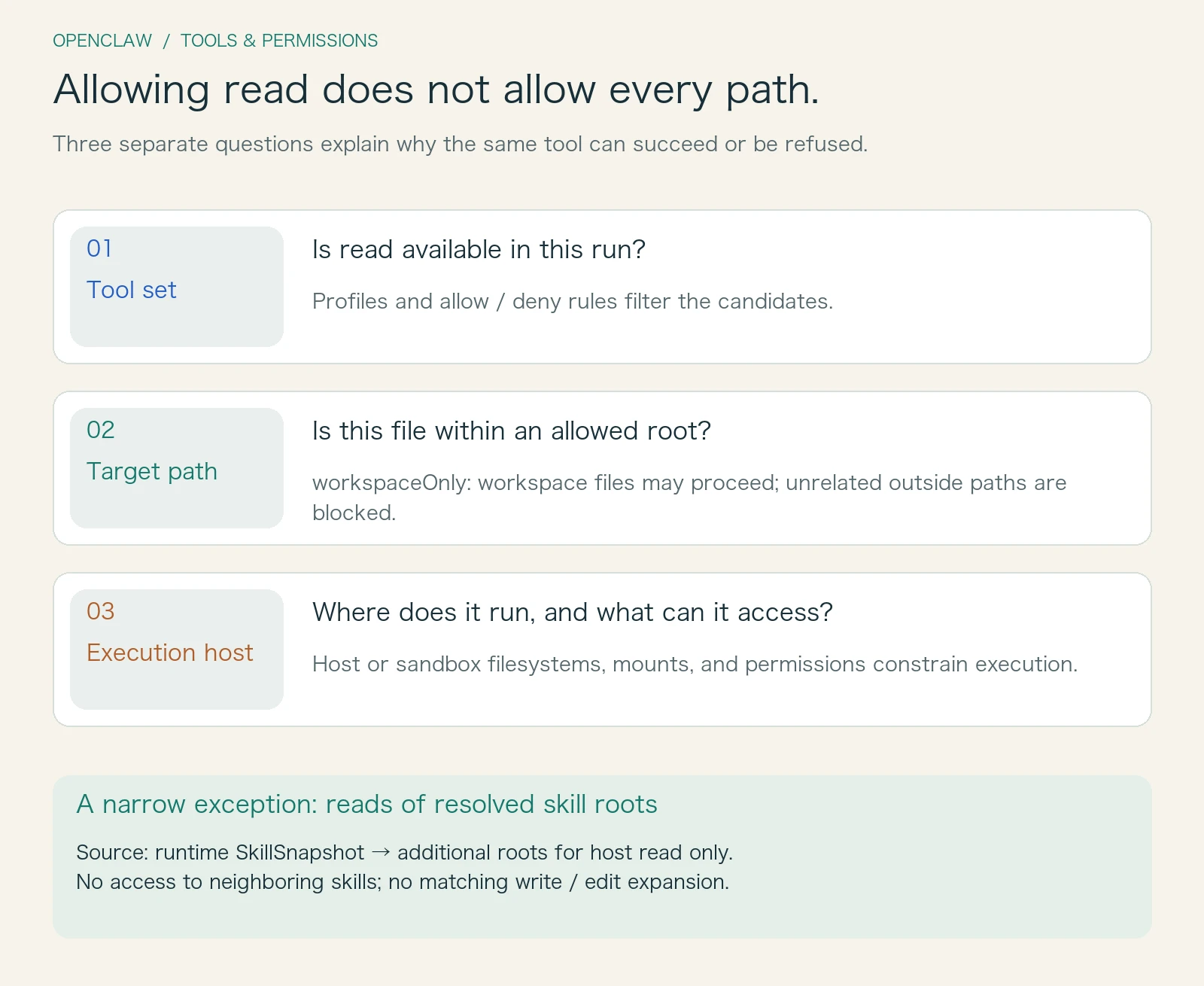
These boundaries constrain different things. The presence of one does not establish that the others are in place.
Does Disabling write Make an Assistant Read-Only?
Return to saving the checklist. If you do not want the assistant to modify files, it may seem enough to disable write and edit.
That depends on its remaining capabilities. If exec is still available, a program it runs may also modify files. Name policy filters tool names; it does not automatically analyze every command's side effects. “No file-writing tool” and “an unwritable execution environment” are different properties. The documentation in this snapshot explicitly makes that distinction. Tool policy and sandbox boundaries
This is why the sandbox is a separate concern. Tool policy primarily determines which capabilities are available. The sandbox and execution host determine where actions happen and which files, mounts, and permissions exist there. A read-only workspace does not automatically make every additional mount read-only.
When a sandbox is active, the source constructs file tools using its filesystem bridge. With read-only workspace access, assembly omits the relevant write, edit, and patch capabilities. The tool collection is reduced while the execution environment also imposes constraints; the two work together. Sandbox tool assembly
One more name can cause confusion: elevated. It concerns the execution location and related authorization for exec. It is not a pass that restores every tool, and it cannot override an effective tool denial. Command approval deserves its own discussion; for now, keep it separate from file-reading permission.
For our checklist, the actual decision is whether the assistant should only produce the content or also save it. If saving is allowed, where may it save? Those decisions belong in capability and resource boundaries, rather than relying on a prompt-level promise to be careful.
The Runtime Can Check Again Before Execution
Beyond tool selection and filesystem paths, OpenClaw also wraps tools with before-execution hooks and cancellation handling.
Once a concrete call arrives, the hook can block it, require approval, or adjust parameters through the defined flow. For the host file tools we are following, the actual call still passes through the inner path guard after the outer hook has run. Seeing a schema earlier does not mean every later call is unconditionally accepted. Before-execution wrapper
To diagnose a refusal, follow the responsibility chain: was the tool constructed, did it survive policy filtering, did a before-execution check block the call, was the path allowed, and did the actual host permit the operation? That identifies the layer responsible.
Repeatedly asking the model to try again rarely helps if the underlying constraint has not changed. A clear reason for rejection helps the person using the system and gives the model useful information for adjusting its plan.
Running the Easily Confused Cases
To check these claims, I ran 31 focused checks against the pinned policy modules. They cover profile expansion, successive filtering, deny precedence, aliases, wildcards, plugin groups, and unknown tool names. The fixture tools have names only; they do not call a real model or execute system commands.
I also ran 13 checks in temporary directories using unchanged source slices of the path guard and the project's pinned fs-safe 0.2.7 dependency. Workspace files and explicitly added skill roots were readable. External paths, neighboring skill directories, and escaping symlinks were rejected. A write tool without the additional root did not modify the skill file.
All 44 checks passed. They verify the local rules discussed here, not a full OpenClaw integration. They do not test real containers, remote execution hosts, every plugin hook, or concurrent path races. Explanations of complete tool assembly and hook behavior remain based on the pinned source.
Building this from scratch, I would separate tool construction, effective-tool-set calculation, and concrete-call checks into three clear interfaces, preserving the source of each refusal. OpenClaw shows that permission complexity comes not only from having many rules, but from the word “allow” referring to different things at different layers. Clear interfaces make it easier to replace a model, tool, or execution environment without accidentally losing an existing constraint.
Whether the checklist gets saved should not depend on how confidently the assistant answers. It should depend on whether the saving capability was actually provided, whether the destination was permitted, and whether execution succeeded. The model proposes the next step; the runtime gives that step a concrete boundary.
Next, we return to what remains afterward: what records are left by a conversation, a tool call, and a run that is still in progress?